You’ve done the hard work. You sourced a great product, built a clean Shopify store, and started driving traffic. But there’s a problem you might not see: your slow product images are quietly pushing shoppers away before they ever click “Add to Cart.”
Here’s the tension every online store owner faces: shoppers demand high-quality visuals to trust your brand and make a purchase, yet oversized, unoptimized images are one of the most common reasons ecommerce pages load slowly. And slow pages cost you money.
According to Portent’s research, ecommerce conversion rates drop an average of 4.42% for every additional second of load time in the zero-to-five-second window. That’s not a rounding error. That’s real revenue walking out the door.
The worst part? Most merchants don’t realize their slow product images are the problem. The photos look great on screen, so everything seems fine. Meanwhile, a 5 MB hero image is silently adding seconds to every page load.
In this post, we’ll put real numbers on the problem. You’ll see exactly how slow product images affect your investment, your conversion rate, your Google rankings, and your bottom line. Then we’ll walk through how to fix it.
How Do Slow Product Images Actually Hurt Your Sales?
Slow product images increase your page load time, which directly reduces your conversion rate. Portent’s analysis of over 100 million pageviews found that ecommerce sites loading in one second convert about 3x better than other online stores taking 5 seconds. Every extra second of delay costs you real, measurable revenue.
The numbers get more specific the deeper you look. A study by Deloitte and Google found that just a 0.1-second improvement in mobile site speed increased retail conversions by 8.4% and average order value by 9.2%.
Read that again: not a full second of improvement, just one-tenth of a second improvement made shoppers spend almost 10% more per order.
And it’s not just conversions. Slow pages drive people away entirely. Google’s own research shows that bounce probability increases 32% when load time goes from 1 to 3 seconds, and this jumps to 90% if load time increases to 5 seconds. For every 1,000 visitors hitting a five-second page, hundreds are leaving before they see a single product.
Why does this matter for images specifically? Because on most ecommerce pages, product photos are the heaviest elements. Graphic elements like product images and banners regularly make up close to two-thirds of a product page’s total weight. If your store is slow, images are almost certainly the biggest reason.
What Makes Product Images “Slow” in the First Place?
The most common cause of slow product images is uploading files that are far larger than they need to be.
Let’s say your product thumbnail displays your images at 800×800 pixels. If you’re uploading a 4000×4000 pixel image straight from your camera, your shoppers technically only see the 800×800 version. Since the browser still downloads the entire 4000×4000 image file, you’re technically wasting load time for unnecessary data, with zero visual benefit to your shoppers.
Three factors determine how “heavy” an image is on a web page.
- File dimensions are the width and height in pixels. A product photo shot on a DSLR might be 5,000 pixels wide, but your Shopify theme only displays it at 1,000 pixels. All those extra pixels still get downloaded, slowing everything down.
- File size is how much space the image takes up, measured in kilobytes (KB) or megabytes (MB). A single uncompressed product photo can easily be 3 to 5 MB. Multiply that by five images per product and a hundred products, and your store is asking browsers to download gigabytes of image data.
- File format matters more than most merchants realize. JPEG is the standard for product photography because it handles color well at smaller file sizes. PNG files preserve more detail but are significantly larger, making them a poor choice for most product photos. WebP, a newer format, offers the best of both worlds with file sizes 25 to 34% smaller than JPEG at equivalent quality.
The common thread? Most merchants upload images straight from their camera, phone, or photographer without any preparation for the web. The photos look beautiful, but they’re carrying unnecessary weight that slows every page they appear on.
The Hidden SEO Cost of Heavy Images
Slow product images don’t just cost you conversions from the shoppers who are already on your site. They also cost you the shoppers who never find you in the first place.
Google uses a set of performance metrics called Core Web Vitals as a direct ranking factor. The most relevant metric for images is the Largest Contentful Paint (LCP). This metric measures how long it takes for the biggest visible element on a page to appear. On most ecommerce pages, that biggest element is a product image or hero banner.
Google considers an LCP of 2.5 seconds or less to be “good.” Anything slower, and your pages start losing ranking power compared to faster competitors.
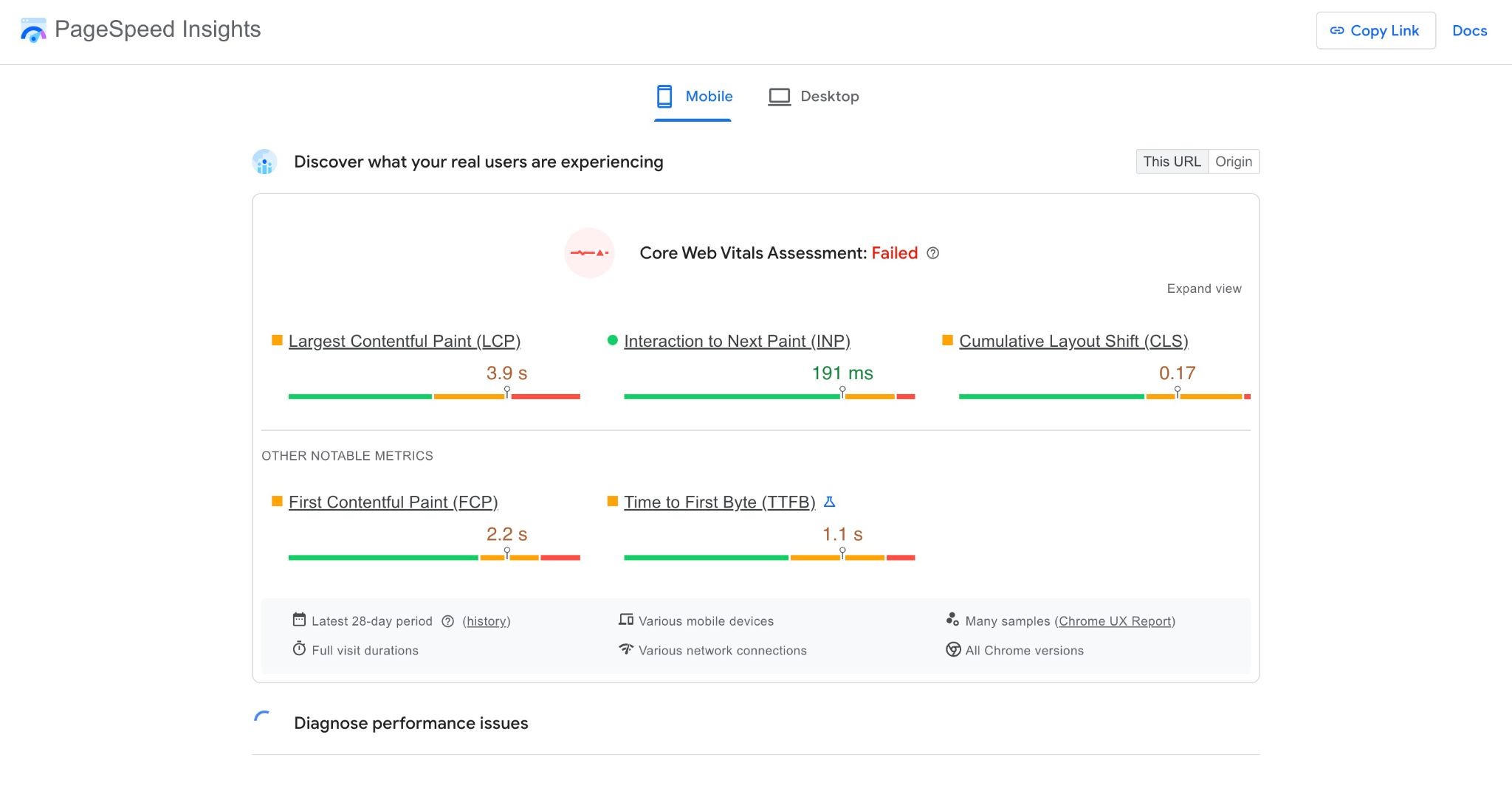
According to a benchmark study of 1,000 real Shopify stores, only 48% of them pass all three Core Web Vitals on mobile. The typical mobile page takes about 2.26 seconds to load its main content. This is just barely under Google’s 2.5-second limit. One unoptimized image or extra script can tip you over Google’s recommended metric.
The impact goes beyond rankings. Google uses mobile-first indexing, which means the mobile version of your site is what Google primarily evaluates. Mobile connections are slower than desktop broadband, so heavy images hit mobile performance especially hard. And with over half of ecommerce traffic now coming from mobile devices, a slow mobile experience means a slow experience for most of your potential customers.
Here’s the practical takeaway: if your ecommerce blog strategy and product pages are built on unoptimized images, you’re handicapping your SEO before you even start competing on content and keywords.
How Do You Check if Your Images Are Slowing Down Your Store?
The fastest way to find out is Google’s free PageSpeed Insights tool. Visit pagespeed.web.dev, enter your homepage URL, and hit “Analyze.” Then do the same for one of your product pages.
- Go to https://pagespeed.web.dev/
- Enter your homepage URL (and later one of your product page URLs)
- Click the ‘Analyze’ button
Once it’s done analyzing your page, look for these two things in the results:
Largest Contentful Paint (LCP)
Check your Largest Contentful Paint score. It’s the first thing you’ll see under Core Web Vitals Assessment. If it’s above 2.5 seconds, your largest visible content (usually an image) is loading too slowly.
Diagnostics > Suggestions
Scroll down to the “Diagnostics” section and look for image-related suggestions such as:
- Properly size images
- Serve images in the next-gen formats
- Efficiently encode images
- Improve image delivery
These tell you exactly which of your product photos or any images in your website need attention and how much time you could save by fixing them.
If you’re on Shopify, you can also check your Shopify admin’s built-in speed report.
- Go to the Online Store section
- Click on the speed section and check your store’s performance
While this report is less detailed than PageSpeed Insights, it gives you a quick benchmark score and flags obvious issues.
A common surprise: merchants often discover that their product images are being served at dimensions far larger than the space they fill on screen. A 3000×3000 pixel image squeezed into a 600-pixel thumbnail is doing five times more work than necessary, and the browser loads every pixel before scaling it down.
If you run the test and your LCP is under 2.5 seconds with no image warnings, you’re in good shape. If not, keep reading.
What Image Size and Format Should You Use for Your Online Store?
For most Shopify stores, product images should be 2048×2048 pixels at maximum, which is Shopify’s own recommendation. This size is large enough to support zoom functionality and look sharp on high-resolution screens, without being wastefully oversized. For collection grid thumbnails, 1024×1024 pixels is plenty.
Target file sizes should stay under 200 KB per image. Many well-optimized product photos come in at 70 to 150 KB without any visible quality loss. If your images are most above 500 KB, compression will make a noticeable difference in load time.
For format, JPEG remains the best default for product photography. It handles complex colors well and compresses efficiently. But if you want the best quality, use WebP since Shopify supports and encourages this. Save PNG for images that need transparency, like logos or icons.
Consistency matters too. When all your product images share the same dimensions and aspect ratio, your storefront looks polished and professional. Mixed sizes create an uneven grid that makes your store look careless, and inconsistent dimensions also make it harder for Shopify’s responsive image system to serve the right sizes to different devices.
Quick reference:
- Product page images at 2048×2048 pixels, under 200 KB, JPEG or WebP.
- Collection grid thumbnails at 1024×1024 pixels, under 100 KB.
- Hero banners at 2400×1200 pixels, under 300 KB.
- Logos and icons as small as possible, PNG or SVG.
Five Ways to Fix Slow Product Images on Shopify
Knowing the problem is half the battle. Here are five practical steps to speed up your product images without sacrificing quality.
- Resize before you upload. Never upload a 5000-pixel image when your store displays it at 2048 pixels or smaller. Resize to the dimensions your theme actually uses. This single step often cuts file size by 80% or more, and it’s the biggest performance win most merchants overlook. You can use free tools like Shopify’s own image resizer tool to batch-resize images before uploading.
- Compress without losing visible quality. After resizing, compress your images to further reduce file size. Lossy compression at 75 to 85% quality removes data the human eye can’t detect, trimming files by 50 to 70% with no noticeable difference on screen. Tools like Squoosh or TinyPNG handle this well for individual images.
- Use consistent dimensions across your catalog. Pick a single aspect ratio (square is the most common) and apply it to every product image. This prevents layout shifts as your pages load, which improves both user experience and your Cumulative Layout Shift (CLS) score. It also keeps your product grid looking clean and professional.
- Enable lazy loading. Lazy loading tells the browser to only download images as the shopper scrolls to them, instead of loading every image on the page at once. Most modern Shopify themes have this built in. If yours doesn’t, it can be enabled with a simple code change or a Shopify app.
- Automate the process. If you’re adding products regularly, manually resizing and compressing every image gets tedious fast. A Shopify app can automate photo editing by resizing, cropping, and optimizing every new image the moment it’s uploaded. This keeps your store fast without adding work to your plate.
Faster Images, More Sales: Putting It All Together
Slow product images are one of the easiest, highest-impact problems to fix on any Shopify store. You don’t need to be a developer or a designer. The fundamentals are straightforward: resize to the dimensions your theme actually uses, use single consistent aspect ratio, compress to cut unnecessary file weight, and use a modern format when possible.
The payoff is real. Faster pages mean higher conversion rates, better search rankings, and a shopping experience that builds trust instead of testing patience. When a 0.1-second improvement can lift retail conversions by over 8%, the return on time spent optimizing your images is hard to beat.
If you want the fastest path to a uniform, optimized product catalog, install Photo Resize on the Shopify App Store. It automatically resizes and optimizes every product image across your store, so every new upload is fast and consistent from the moment it goes live. Your contextual product photos and clothing photography will still look stunning. They’ll just load in a fraction of the time.
Frequently Asked Questions
Do slow product images hurt my sales?
Yes. Product images are typically the heaviest elements on ecommerce pages. Slow-loading pages directly reduce conversion rates. Research shows that ecommerce sites loading in one second convert at roughly three times the rate of those loading in five seconds. Bounce rates also climb steeply with every extra second of delay, meaning many shoppers leave before they even see your products.
What is a good image file size for ecommerce?
For most online stores, product images should be under 200 KB per file. Many well-optimized photos come in between 70 and 150 KB without any visible loss in quality. The key is to resize your images to the dimensions your theme actually displays (typically 1024 to 2048 pixels for Shopify) and then compress them using a tool or app before uploading.
Does image size affect SEO?
Absolutely. Google uses Largest Contentful Paint (LCP) as a Core Web Vitals metric and ranking factor. On most product pages, the largest contentful element is an image. If that image is too large and loads slowly, it hurts your LCP score, which can lower your search rankings. Faster-loading images also improve crawl efficiency, helping Google index more of your pages.
How many product images should I have per page?
There’s no universal rule, but more images generally help shoppers feel confident in a purchase. Show multiple angles, close-ups, and lifestyle shots. The key is to optimize every image so the additional files don’t slow down the page. If each image is properly sized and compressed, you can comfortably include five to eight images per product without harming performance.
Will compressing my images make them look blurry?
Not if you do it correctly. Lossy compression at 75 to 85% quality is generally indistinguishable from the original to the human eye. The visual difference is invisible on screen, but the file size reduction is dramatic, often 50 to 70% smaller. Start with a moderate compression setting and compare before and after. You’ll be surprised at how much size you can shed without any noticeable blur.
Share on social: