

TL;DR: Running a store alone means you can’t add hours to your day, only redistribute them. A 4-step ecommerce time management framework beats 20 generic tips: track where your week actually goes for five days, sort each task with the $10 vs $1,000 task test, block your calendar around three modes (deep work, operations, and admin), then shed the rest through automation or outsourcing. This is the time management framework built for one-person stores.
Most ecommerce time management advice was written for someone with a team. You see the same answers everywhere: hire help, delegate it, build a system. Those answers land flat when you ARE the team.
Running a store alone usually means a 50-plus-hour week. The math doesn’t favor you. You can’t add hours to your week. This means your only real lever is the redistribution of your time.
This blog is a practical online store time management framework built for one-person shops. We’ll discuss four steps to help you: track your week, sort each task by value, block your calendar around three modes of work, then shed everything else through automation or outsourcing. By the end of this post, you’ll have a system you can run on a busy Tuesday, not just plan on a quiet Sunday.
Why is time management so hard when you run an ecommerce store alone?
Time management is hard when you run a store alone because you switch between roles every hour. You’re the buyer at 9am, the packer at 11am, the marketer at 2pm, and the support rep at 4pm.
Each time you switch tasks, it costs your focus. Stacked together, those costs eat into your whole week. Every time you jump from packing orders to writing a product description, your brain spends 5 to 15 minutes catching up. Do that 20 times a day, and you’ve burned roughly 2 hours just on transitions.
It’s also one of the top time killers for small business owners, alongside non-work distractions and waiting on status updates from multiple tools. So generic productivity advice (do one thing at a time, block notifications, single-task) misses the real issue.
How much time does running a store actually eat?
Running a store alone usually means a 50-hour week. Of that, only about 1.5 hours a day is uninterrupted focus, and small business owners lose another 96 minutes a day to distractions and context switching.
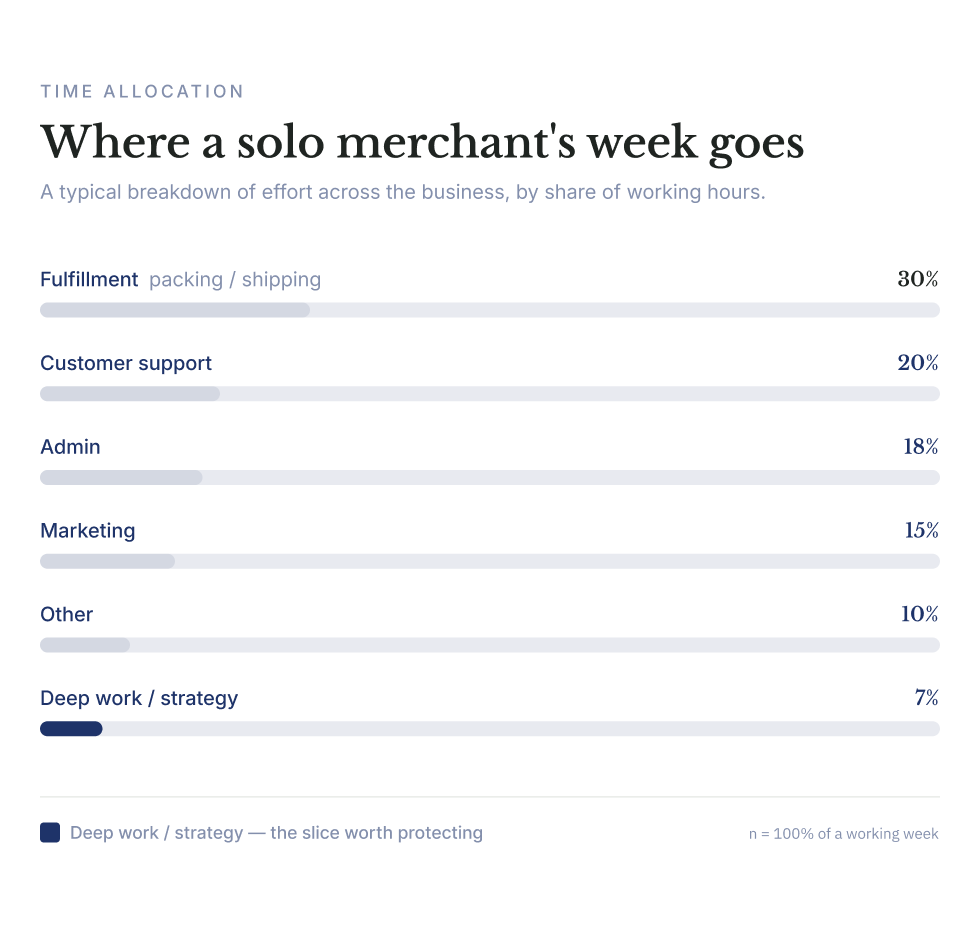
There’s a deeper split beneath those numbers: time in the business (packing today’s orders or answering support emails) versus time on the business (deciding what to sell next quarter or rebuilding the homepage to improve conversion). About 68% of an entrepreneur’s time goes to day-to-day work. Only 32% goes to growth or strategy.
For a one-person store, that ratio usually skews even worse because there’s no team to absorb the day-to-day work.
What this means for you: the goal of a time management framework isn’t to make you faster at everything. It’s to move hours out of the 68% bucket and into the 32% bucket. The four steps below are all aimed at that shift.
The 4-step framework: Track, sort, block, shed
That gap between working in the business and on-the-business time is exactly what this framework targets. It’s a system for solo merchant productivity that doesn’t lean on willpower. Our goal is to provide you with a system where the structure does the work.
The framework has four moves in order: track, sort, block, and shed. The order matters as much as the steps themselves.
- You track first because guessing where your time goes is unreliable, even when you’re the one spending it.
- Sort comes next, because the sort tells you which tasks deserve calendar real estate.
- Blocking only works once you’ve sorted.
- And shed (cut, automate, or outsource) only works once you know what’s left after blocking the high-value work.
Run it once, and you’ll see returns in week two. Run it as a monthly habit, and it keeps working. Because what counts as $1,000 work shifts as your store grows.
Step 1: Track one full week before you change anything
Don’t redesign your week before you have data on what it actually looks like. It’s easy to underestimate how much customer support eats and overestimate how much marketing gets. The only way to know is to log it for five working days.
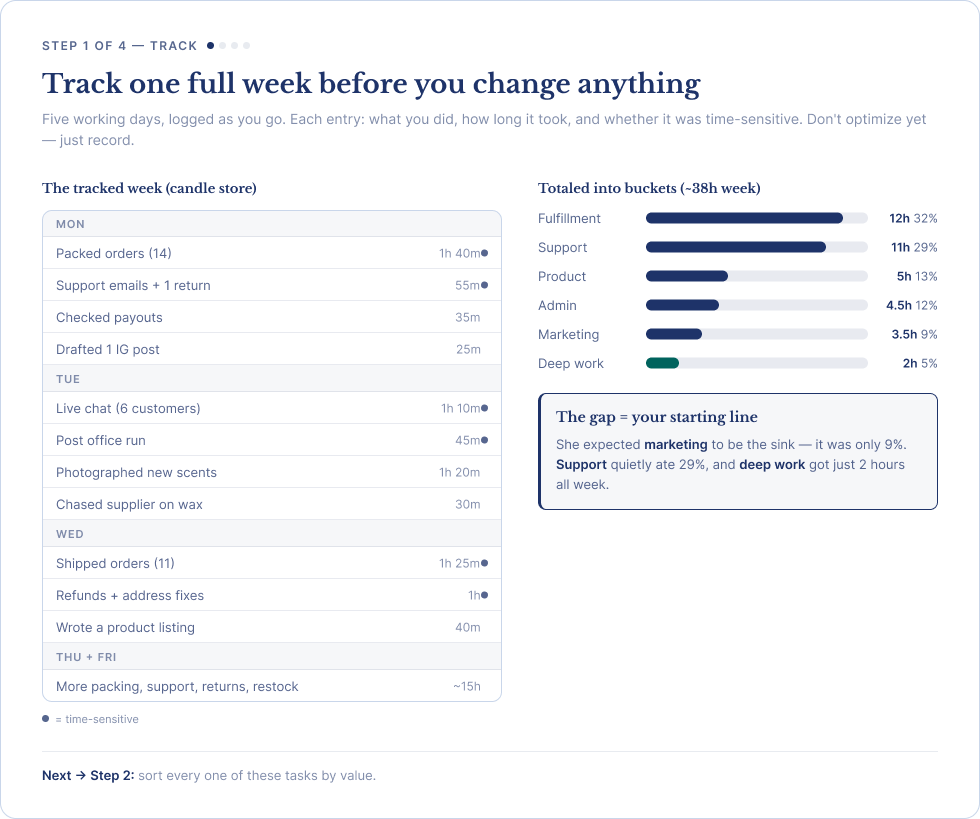
The setup is simple. Open a notes app or a free tool like Toggl. Every time you switch tasks, write down three things:
- What you just did
- How long did it take
- Whether it was time-sensitive
Don’t optimize while you track. Don’t skip tracking the small stuff either. Twenty minutes of replying to one customer counts.
At the end of the week, group your entries into buckets. Common ones for a one-person store:
- Fulfillment (picking, packing, shipping)
- Customer support (email, chat, returns)
- Marketing (content, ads, social, email)
- Product (sourcing, listings, photography)
- Admin (bookkeeping, supplier coordination, platform tweaks)
- Deep work (strategy, planning, big projects)
Total each bucket. Compare what you expected to what’s actually there. The gap is your starting line for Step 2.
Step 2: Sort each task with the $10 vs $1,000 task test
Look at your tracked week. Ask one question for every task: Is this a $10 job or a $1,000 job? That single question does most of the prioritization work for you.
- A $10 job is something you could outsource to a junior freelancer or use an automation tool without losing quality. For example: replying to ‘where’s my order?’ emails, resizing one product photo by hand, and copy-pasting tracking numbers. None of these grows your store; they keep it running.
- A $1,000 job is something only you can do, or where doing it well moves real revenue. For example: picking the next product to launch, writing the homepage copy, calling your top three customers to understand why they came back. A single hour on a $1,000 job is worth weeks of $10 jobs stacked together.
Go through your tracked log, and mark every entry with a 10 or a 1,000. Be honest about which is which. Your week is probably 70 to 80% $10 jobs. This is exactly the imbalance the framework fixes.
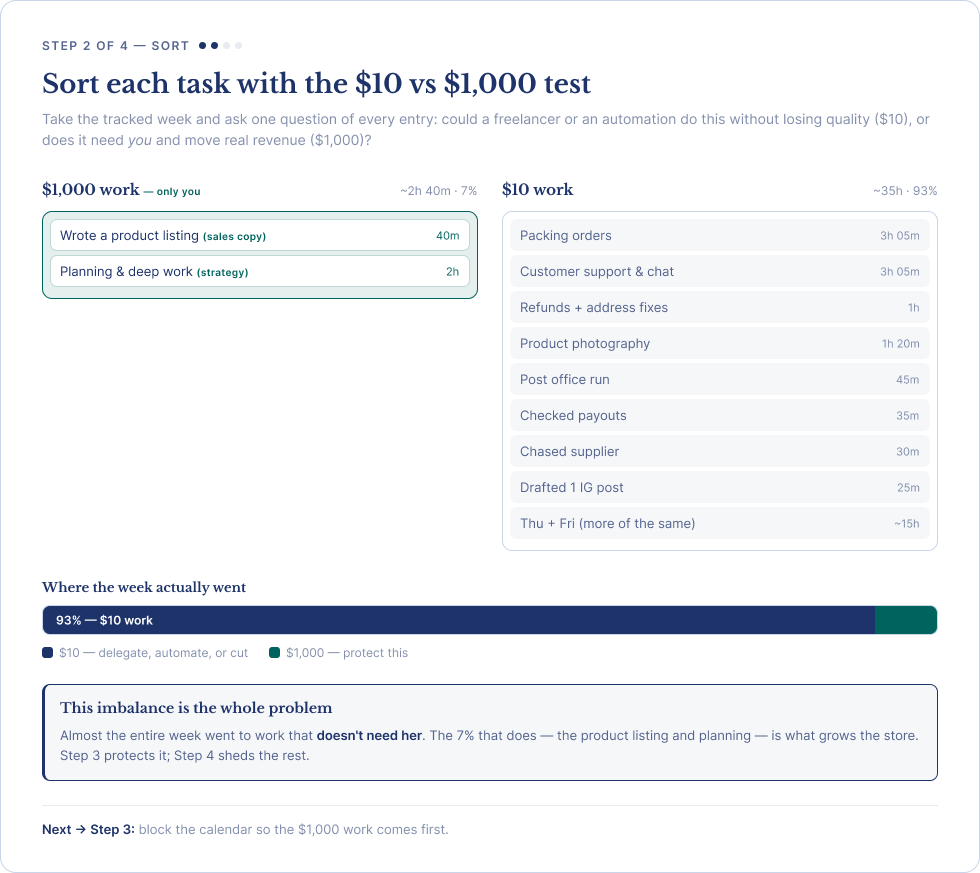
If you want a head start on the sorting, these tasks worth outsourcing are almost always $10 jobs for a one-person store. Use the list as a checklist when you’re not sure.
Step 3: Block your calendar around three modes of work
Once you know which tasks are $1,000 work, the next move is to block them out on your calendar. You don’t want to schedule every task individually – there are too many of them. The schedule breaks as soon as the next time a supplier emails you.
The cleaner approach is to block your week around three modes of work. Time blocking for ecommerce works best when the blocks are wide, not narrow.
Mode 1 is deep work
This is where $1,000 tasks live: writing, strategy, product decisions, growth experiments. Give it your best hours, usually the first two to three hours of the day. Protect it like a meeting with your most important customer, because that’s effectively what it is.
Mode 2 is operations
This covers the running of the store: picking and packing, customer support, inventory updates, and supplier check-ins.
Batch it. A single two-hour window doing operations in the late morning beats four 30-minute interruptions across the day. If you ship orders yourself, set aside one or two packing windows a day instead of packing every order the moment it comes in.
Mode 3 is admin and review
Bookkeeping, store tweaks, weekly planning, and the Friday review (more on that later) all sit here. These belong in your lowest-energy window, usually after lunch or the end of the day.
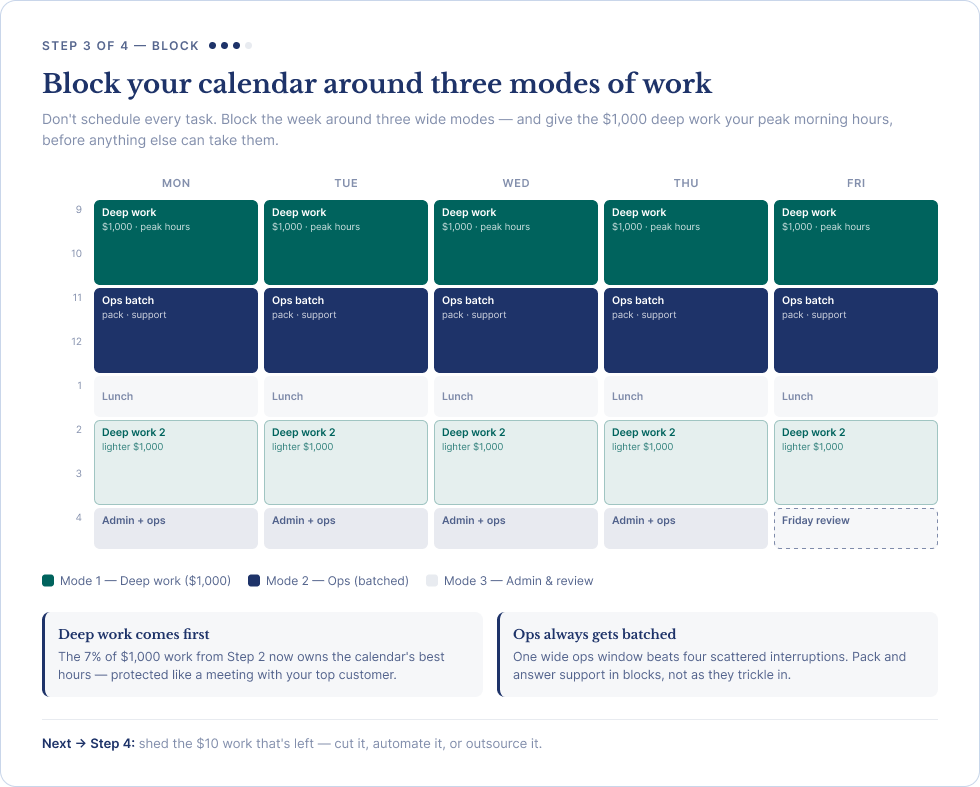
A typical solo merchant week might look like this:
- Morning (9am to 11am): Deep work (Mode 1)
- Late morning (11am to 1pm): Operations batch (Mode 2)
- After lunch (2pm to 4pm): Second deep work block on lighter $1,000 tasks
- Late afternoon (4pm to 5pm): Admin plus second operations batch (Modes 2 and 3)
Two things matter more than the exact times: the deep work block always comes first, and operations should always be batched. Adjust the hours to your own energy peaks. Some people do their best work at 6am; others at 9pm.
Step 4: Cut, automate, or outsource everything else
Everything you didn’t block is fair game for cutting, automating, or outsourcing. Take each $10 task from your list and run it through these decisions below, in order.
Can you cut it?
Some $10 tasks shouldn’t be done at all. For example, you shouldn’t be manually checking inventory every day when your store is set up to auto-reorder. Or, you shouldn’t be maintaining a margin spreadsheet when your Shopify dashboard already shows the numbers. Killing low-value tasks costs nothing, and it frees the most time.
Can you automate it?
Most $10 work in ecommerce can be automated now, and most of it can be done cheaply. The biggest wins for a solo store:
- Abandoned cart emails (auto-send, no manual reach-out)
- Inventory sync across channels
- Shipping label generation
- Customer support FAQ answers (chatbots or canned responses)
- Product image resizing, background removal, and alt text
- Order tagging and routing
For a deeper map of what to automate first, our post about ecommerce automation for solo merchants covers where to start without over-engineering. If you want a tools-first view, our post on marketing automation tools you can start using today lists the ones with the fastest setup. For inventory specifically, these inventory automation techniques handle the boring parts of stock control.
Image work deserves its own callout. If you sell physical products, photo prep is one of the highest-volume $10 tasks in the business. Pixc’s apps automate the worst of it: AI Photo Resize handles bulk resizing, cropping, and product photo uniformity, AI Auto Alt Text writes SEO-friendly alt text on autopilot, and AI Image Editing strips backgrounds in batches.
Browse the full Pixc app collection to see which one fits the time sink you want to remove first. Each app removes a recurring task you’d otherwise handle by hand.
Can you outsource it?
Once you’ve cut and automated, what’s left usually falls into two buckets: fulfillment volume and customer-facing work. The rough thresholds:
- 35+ orders per day: consider a 3PL for shipping
- 10+ support emails per day: consider a part-time virtual assistant
- 1+ hour per day on graphics or photo prep: consider outsourcing photo editing or batch processing
If you’re new to delegation, this step-by-step virtual assistant hiring guide covers exactly what to include in a first job description. This way, you can spend the first month training the right person.
The order matters here, too. Cut first, automate second, outsource third. Outsourcing a task you should have killed is the most expensive time mistake you can make.
One more habit closes step 4: write a one-page SOP for whatever’s left after cutting, automating, and outsourcing. The SOP isn’t busywork. It’s the document you hand the next freelancer or VA, so the answer to ‘how do I do this?’ lives outside your head.
How do I keep this working when the week falls apart?
All four steps depend on one habit: a 15-minute weekly review, usually on a Friday. Look at what slipped, what stole your time, and what’s still in the $10 bucket. The framework holds because you re-sort weekly, not because you wrote it down once. A system that survives a bad week is the only one worth running.
Every framework breaks. A supplier delay turns Wednesday into a fire drill, a sick day costs you a deep work block, or peak season inverts your calendar for six weeks. The point isn’t to never break. It’s to come back without throwing the whole thing out.
Three habits keep the framework alive:
- A 15-minute Friday review where you re-sort the week’s tasks ($10 vs $1,000) and adjust next week’s blocks.
- Do a quick one-day audit each month to spot any drift before it adds up.
- A peak-season pre-block where you compress operations and pause deep work for a defined window, then return to the full system after.
When time management fails, energy management is the backup. Some weeks, the move is to stop trying to optimize the calendar and just protect sleep, meals, and one daily 60-minute block of $1,000 work. That’s still the framework. It’s just running on emergency power.
Putting the framework to work
Here are the four steps summarized for you:
- Track your week with a notes app for five days
- Sort each task with the $10 vs $1,000 task test
- Block your calendar around three modes: deep work, operations, and admin
- Shed everything left by cutting it, automating it, or outsourcing it
Run that loop, and the gap between ‘how much I work’ and ‘what I get done’ will close fast. Don’t add hours. Move them out of $10 work and into $1,000 work. The fastest win for most solo stores is the ‘automate’ step, and image work is usually a large chunk of it. Browse Pixc’s Shopify apps to start removing one repeat task at a time and begin with whichever one is taking up the most hours this week.