

If you’re running an online store solo (or with a tiny team), you already know the math. There are only so many hours in your day, and most of them get eaten by work that isn’t actually growing your business. Ecommerce automation is how you claw some of those hours back.
Just imagine. You started your store to sell things you actually care about. Then somewhere along the way, you became the order confirmation department, the inventory checker, and the person who resizes 40 product photos at midnight. We’ve been there too, and so have most of the merchants we work with.
Here’s the good part: automating your online store in 2026 doesn’t need a developer, a big budget, or a computer science degree. The tools available today are mostly free, mostly no-code, and genuinely built for people running a store on the side of the rest of their lives. Stores that use automation see 10-12% average revenue gains and cut manual work by 40-60%. That’s the difference between answering tickets all evening and actually having dinner.
This guide skips the “47 tools you’ll never use” routine. We’ll walk you through where to start with ecommerce automation, the five workflows worth setting up this week, and what to add once those are humming along. If you’re on Shopify, the good news is that most of what we’ll cover falls under Shopify automation tools that are already free or close to it. The rest works for any platform.
What is ecommerce automation (and why should solo merchants care)?
Ecommerce automation is just software doing your repetitive store work for you, on its own. For a solo merchant, that’s the difference between losing an hour a day to order emails and inventory checks, and having that hour back for things only you can do.
The pattern behind every automation is the same three steps: trigger, condition, action. Here’s an example to help you understand it better:
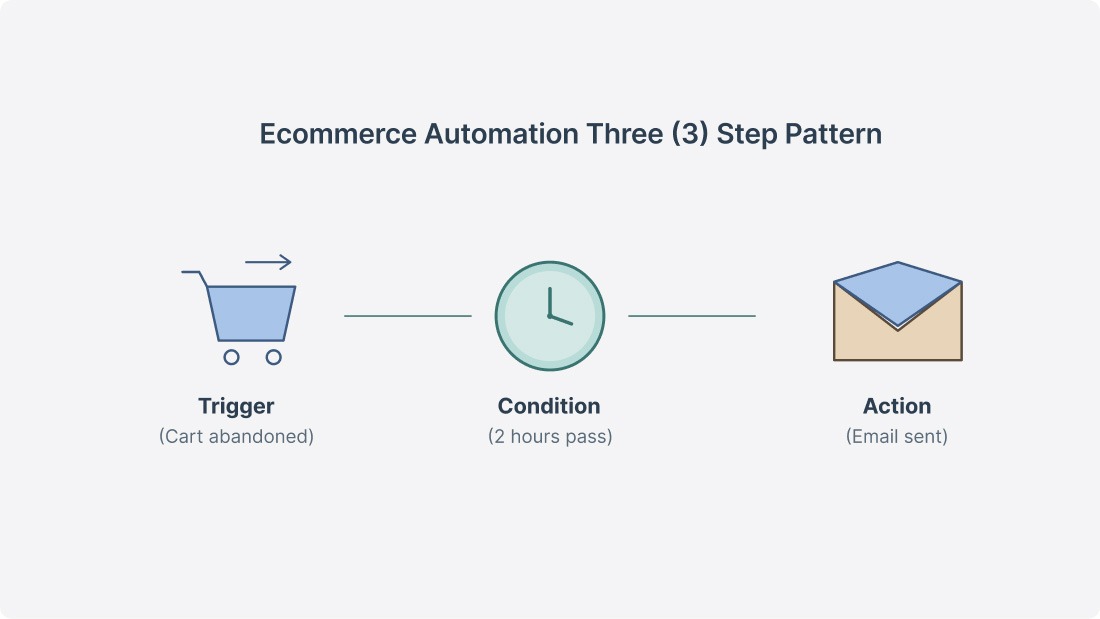
- Trigger: A customer abandons their cart
- Condition: Two hours pass without them coming back
- Action: Your store sends a reminder email.
You’re not in the loop. You don’t even know it happened until you check the dashboard. None of this is new, but the access has changed significantly over the past few years.
Before, this kind of setup needed a developer or an enterprise plan. Now, platforms like Shopify bake automation into every paid tier. In fact, about 70% of ecommerce businesses are using some form of automation today. If you’re not, you’re working harder than your competitors for the same result.
One thing worth saying upfront: ecommerce automation isn’t about replacing yourself. It’s about cloning the boring parts of your day so the creative, strategic, relationship-building work gets the time it deserves. The repetitive, rule-based stuff is what software handles best. The judgment calls stay with you, and that’s a feature, not a bug.
What should you automate first in your online store?
Short answer: Start with whatever’s costing you the most time or money right now.
For most solo stores, that’s abandoned cart recovery. The average cart abandonment rate hovers around 70%, meaning roughly seven out of every ten shoppers add something to their cart and walk away. A simple automated reminder can win back a real chunk of those sales without you doing anything in the moment.
That said, abandoned carts might not be your biggest leak. Maybe you spend two hours a day answering the same three customer questions. Maybe you’re updating inventory across channels by hand.
The right first ecommerce automation is the one that fixes your worst bottleneck, not the one some article (including this one) tells you matters most. So how do you actually decide what to automate first in your online store? Here are a few tips we share with merchants when they’re staring at the long list of options and not sure where to start.
- Run the three-question audit on your last week. Look back at the past seven days and ask yourself: which task did I do most often, which one made me sigh the loudest, and which one would cost me real money if I forgot to do it? If the same task shows up in two of those three answers, that’s your starting point. It’s a quick gut check, and it almost always points to something obvious you’ve been putting off.
- Pick the task with a clear trigger and a clear outcome. Ecommerce automation works best when you can describe the job in one sentence: “when X happens, do Y.” If you can’t say it that simply, the workflow is probably too complex for a first attempt. Save the messy stuff for later and start with something clean — like sending a follow-up email two days after delivery, or tagging any customer who spends over $200.
- Automate one workflow at a time. Don’t try to set up ten automations in a weekend. We’ve watched merchants do this and end up troubleshooting all of them instead of running their store. Pick one workflow, set it up, watch it run for a few days, confirm it’s doing what you want, then move to the next. Slow is faster here.
- Match the automation to your stage. A brand-new store with five orders a week doesn’t need fraud detection workflows or complex segmentation. It needs the basics: cart recovery, order confirmations, and low-stock alerts. As your volume grows, the value of more advanced automations grows with it. Don’t build for a problem you don’t have yet.
- When in doubt, follow the natural order. For most Shopify merchants running solo, the priority looks like this: abandoned cart emails first (the revenue impact shows up fast), then order and shipping notifications (fewer support questions), then low-stock alerts (overselling is expensive and embarrassing). Once those three are running, branch out based on what your store actually needs.
How does Shopify Flow make ecommerce automation free and no-code?
Shopify Flow is a free automation app that comes with every paid Shopify plan, including the Basic plan. You build workflows by dragging and dropping pieces onto a canvas — no code, no setup fees. If you can describe what you want in plain English, you can build it in Flow.
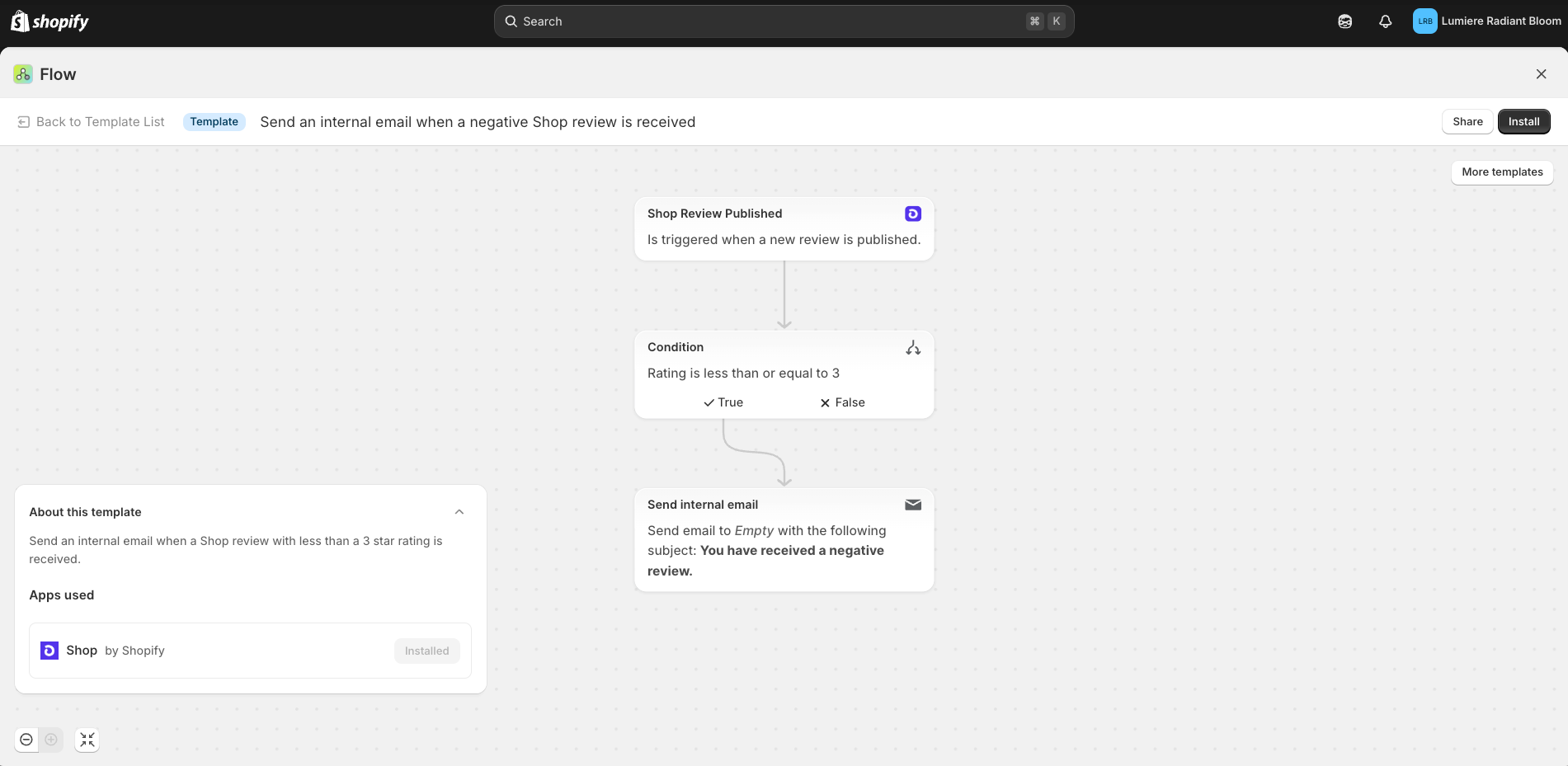
The biggest 2026 update is Sidekick, Shopify’s built-in AI assistant. Instead of dragging triggers and conditions around yourself, you can describe what you need in plain language, and Sidekick puts the workflow together for you. What used to take 30 minutes now takes about three. You still review everything before it goes live, so nothing fires off without your okay.
Flow also comes loaded with hundreds of pre-built templates for the stuff most merchants need. Tag high-value customers automatically? Template. Get a Slack ping when inventory drops below ten units? Template. Hide out-of-stock products from your collection pages? Also, a template. You’re rarely starting from scratch.
A few honest limitations to flag. Flow works best inside the Shopify ecosystem. If you need it to talk to your accounting software, a non-Shopify email tool, or some custom system, you’ll probably want a connector like Zapier or MESA in the mix. Flow also caps loops at 100 items, which only really matters for wholesale stores processing huge orders. For solo merchants, you’ll likely never bump into it.
Bottom line: if you’re on a paid Shopify plan and Flow isn’t installed yet, you’re leaving free help on the table. Install it today and you’ll have your first automation running before the end of the afternoon.
Five automations every solo merchant should set up this week
These are the five automations that consistently save solo merchants the most time, ranked by how much you get back relative to how easy they are to set up. Work top to bottom and you’ll feel the difference within the first week.
Abandoned cart recovery emails
This is the highest-ROI automation for almost any store, full stop. Shopify has built-in abandoned checkout recovery that fires off an email to anyone who leaves items in their cart. You pick the delay (one hour, six, ten, or 24) and tweak the message to sound like you. If you want something more advanced, Klaviyo and Omnisend let you build multi-step sequences with personalized product images and discount triggers. Either way, you’re recovering revenue that would’ve otherwise just disappeared.
Order and shipping confirmation emails
Shopify sends basic order confirmations on its own, but most merchants don’t realize you can customize them or add post-purchase follow-ups. A well-timed shipping update is the single best way to cut down on “where’s my order?” support questions. You can set these up in Shopify’s notification settings or through your email marketing app if you want more control over the design and timing.
Low-stock inventory alerts
Nothing tanks customer trust faster than someone ordering a product you don’t actually have. Use Shopify Flow to send yourself a notification (email, Slack, SMS — your choice) the moment a product variant drops below a threshold you set. Five minutes to build, and it’ll save you from at least one painful refund-and-apology email this quarter.
Customer tagging and segmentation
As orders roll in, Flow can tag customers based on what they do: first-time buyer, repeat customer, big spender, local pickup. These tags don’t seem like much on day one, but they get powerful fast. When you eventually want to send targeted emails or run a promo for your top 10% of customers, you’ll already have clean, organized data ready to go. Set this up early, and your future self will thank you.
Product image resizing and optimization
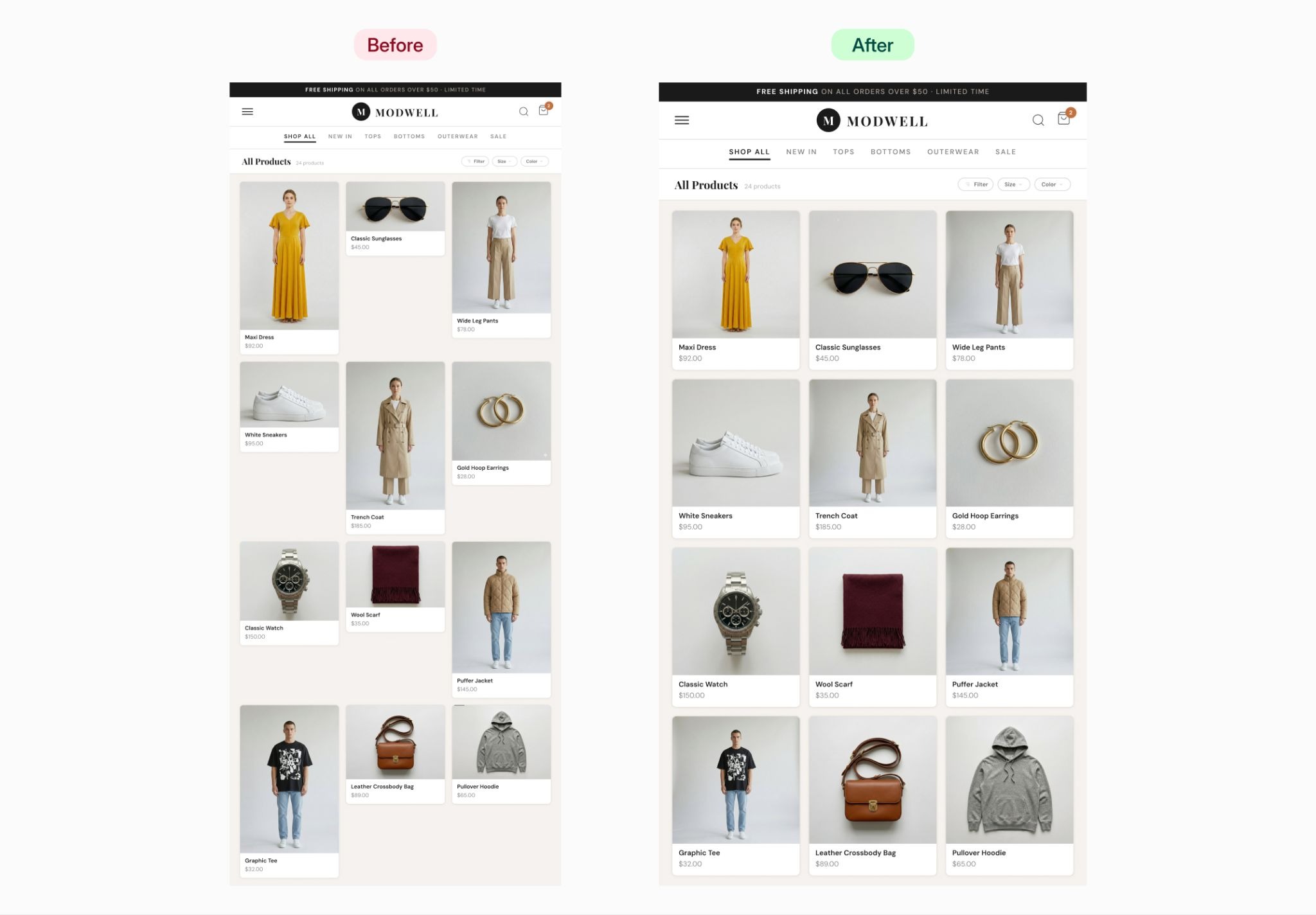
This one flies under the radar, but it’s a serious time-saver. Inconsistent product images make a store look amateur, and they hurt conversion rates more than most merchants realize. Instead of opening Photoshop every time you add a new product, you can let an app handle it. Photo Resize by Pixc resizes all your product images to a uniform aspect ratio in a few clicks and runs in the background as you add new ones. Pair it with an alt text tool, and your Shopify images stay optimized, and your image alt text for SEO gets handled at the same time. Two boxes ticked, zero hours in front of an editor.
Beyond the basics: Automations to add as you grow
Once your starter five are running quietly in the background, you’ll start spotting other tasks worth handing off. Here’s where most merchants we work with go next.
- Email marketing flows are the obvious next layer. Klaviyo and Omnisend both plug into Shopify and let you build sequences triggered by what customers actually do. A welcome series for new subscribers, a win-back for people who haven’t bought in 90 days, and a post-purchase review request — those three alone can be set up in an afternoon, and they keep working long after you’ve forgotten about them.
- Automated review collection builds your social proof without the awkward manual asks. Apps like Judge.me or Yotpo will request a review a set number of days after delivery, then post it on the right product page. Reviews are one of the strongest trust signals new shoppers look for, so the steady drip really does compound over time.
- Fraud detection workflows start mattering once your order volume picks up. Shopify Flow can flag orders that look off — mismatched billing and shipping addresses, weird purchase patterns — and hold them for you to glance at. You’re not reviewing every order, just the suspicious ones, which is a much better use of your eyeballs.
- Cross-channel inventory sync is essential the moment you’re selling on multiple marketplaces. When you sell something on Shopify, your stock count needs to update on Amazon, Etsy, or wherever else you list. Tools like Stock Sync (or Shopify’s own marketplace integrations) handle this so you’re not selling inventory you don’t have and refunding angry customers later.
As you stack these on, keep one rule in mind: every new automation should solve a real problem you’re hitting today, not a hypothetical one. If you’re not doing it manually now, you probably don’t need to automate it. Complexity for its own sake is just a different kind of busywork.
Can one person really run a fully automated store?
Yes, but “fully automated” is a spectrum, not a switch you flip. One person can realistically automate 60-70% of the repetitive daily tasks involved in running an online store using free or affordable tools. The other 30-40% is the work that actually needs you, and that’s where your hours should go.
Here’s what software handles well: sending behavior-based emails, updating inventory counts, resizing and optimizing product images, generating shipping labels, flagging suspicious orders, and segmenting customers by purchase history. These are rule-based, repetitive jobs. Software does them faster and more consistently than you ever could on your best day.
Here’s what still needs you: choosing what to sell, writing copy that sounds like a human wrote it, handling messy customer complaints, making pricing calls, building real relationships in your niche, and taking great product photos. All of that takes judgment, taste, and empathy — three things software is still pretty bad at.
The merchants who thrive solo in 2026 aren’t the ones who automate the most. They’re the ones who automate the right things. Bain & Company’s research, shared on Shopify’s blog, found that companies leading in automation investment cut their costs at more than double the rate of laggards. Translation for you: every smart automation you set up today compounds, and the merchants doing this well are quietly pulling ahead while everyone else is stuck in the inbox.
We like to think of automation as a quiet business partner. It clocks in on time, doesn’t get tired, and does the same task perfectly every single time. Your job is to point it at the right work, then spend your freed-up hours on the stuff only you can do — which, conveniently, is also the stuff that grows your business.
Start small, Build momentum
Ecommerce automation in 2026 isn’t about robots running your store while you sip mai tais on a beach. It’s about getting one workflow off your plate this week, then another the week after, until your day actually feels like running a business instead of putting out fires.
So here’s the action plan: install Shopify Flow today (it’s free, takes two minutes). Set up one automation this week — abandoned cart emails are the easiest win. Watch it work, then move to the next. Within a month, you’ll have five automations quietly handling things in the background, and you’ll wonder how you ever did it the old way.
If product image optimization is on your list, that’s where we can help. Our Photo Resize by Pixc app automatically resizes your Shopify product photos to a consistent size, so your store looks polished without you opening Photoshop. It’s one less thing to think about, and your collection pages will look better for it.
The merchants who win at this aren’t necessarily the ones grinding the hardest. They’re the ones who set up systems that work while they sleep. Pick one task today and let software take it — that’s how you start to automate online store work without losing what makes your shop yours.
Frequently Asked Questions
What is ecommerce automation?
Ecommerce automation is software handling the repetitive parts of running an online store for you, automatically. Think abandoned cart emails, inventory updates, shipping notifications, and customer tagging based on what they buy. Every automation follows a simple trigger-condition-action pattern: something happens in your store, the software checks if your rules apply, and then it does the thing. You’re not in the loop unless you want to be.
Is Shopify Flow free in 2026?
Yes, completely free on every paid Shopify plan: Basic, Grow, Advanced, and Plus. Flow used to be a Shopify Plus exclusive, but they opened it up to everyone in 2023. The only plan that doesn’t include it is the Starter plan, which is built more for social selling than running a full online store.
What’s the best first automation for a new online store?
Abandoned cart recovery emails, in most cases. With cart abandonment averaging around 70%, even winning back a small slice of those carts puts real money back in your pocket. Shopify includes basic abandoned checkout recovery on every plan, so you can have it running in minutes without paying for anything extra.
Do I need to know how to code to automate my Shopify store?
Not at all. Shopify Flow uses a drag-and-drop builder, and the 2026 Sidekick AI update means you can describe what you want in plain English and it builds the workflow for you. Tools like Klaviyo, Omnisend, and Zapier are also fully no-code. Pretty much every useful store automation can be set up without writing a single line of code.
How much time can ecommerce automation actually save?
It depends on your store and how much manual work you’re doing now, but the typical range is meaningful. Reports suggest automation can cut manual work by 40-60%. For a solo merchant putting in 2-3 hours a day on repetitive stuff, that’s roughly 8-12 hours back per week. Shopify itself reports merchants using Flow saving 15-20 hours weekly, though your mileage will vary.