
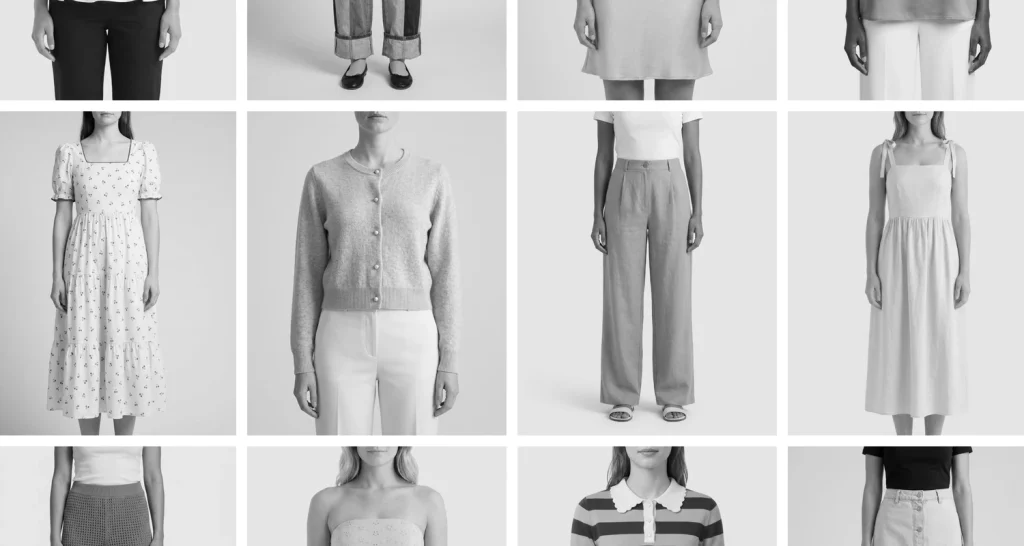
If you run a Shopify store, you’ve probably collected your product photos over a few years. Some came from your supplier, some are from a shoot you did when you launched, a few were taken on your mobile phone, and the newer ones might have been edited with an AI tool.
Each photo looks fine when you open it on its own. The problem shows up when you look at a collection page and see 20 products side by side.
We see this in a lot of stores, and it’s the reason we created Store Styling.
Store Styling is a Pixc service where we take the product photos you already have and edit them as one collection, so you get consistent product photos across your whole store. You don’t need to reshoot anything, and your first collection (up to 40 products) is free.
In this post, we cover what makes a store look messy, why fixing images one at a time doesn’t solve it, where AI editing helps and where it shouldn’t be used, and how to get started.
Mismatched product photos can make your store look unprofessional
Mismatched product photos make a store look unprofessional because shoppers rarely look at one image at a time. They land on a collection page or search results and see a grid, and anything that doesn’t match stands out straight away. And not looking professional can cause a shopper to lose trust.
The most common differences we see are:
- Backgrounds that are white in some photos, gray in others, and a lifestyle scene in a few.
- Products cropped at different distances, so a small candle looks bigger than a large vase.
- Shadows under some products and none under others.
- Lighting and color that change from photo to photo, so the same black looks brown in one shot and blue in the next.
- Square photos sitting next to portrait ones.
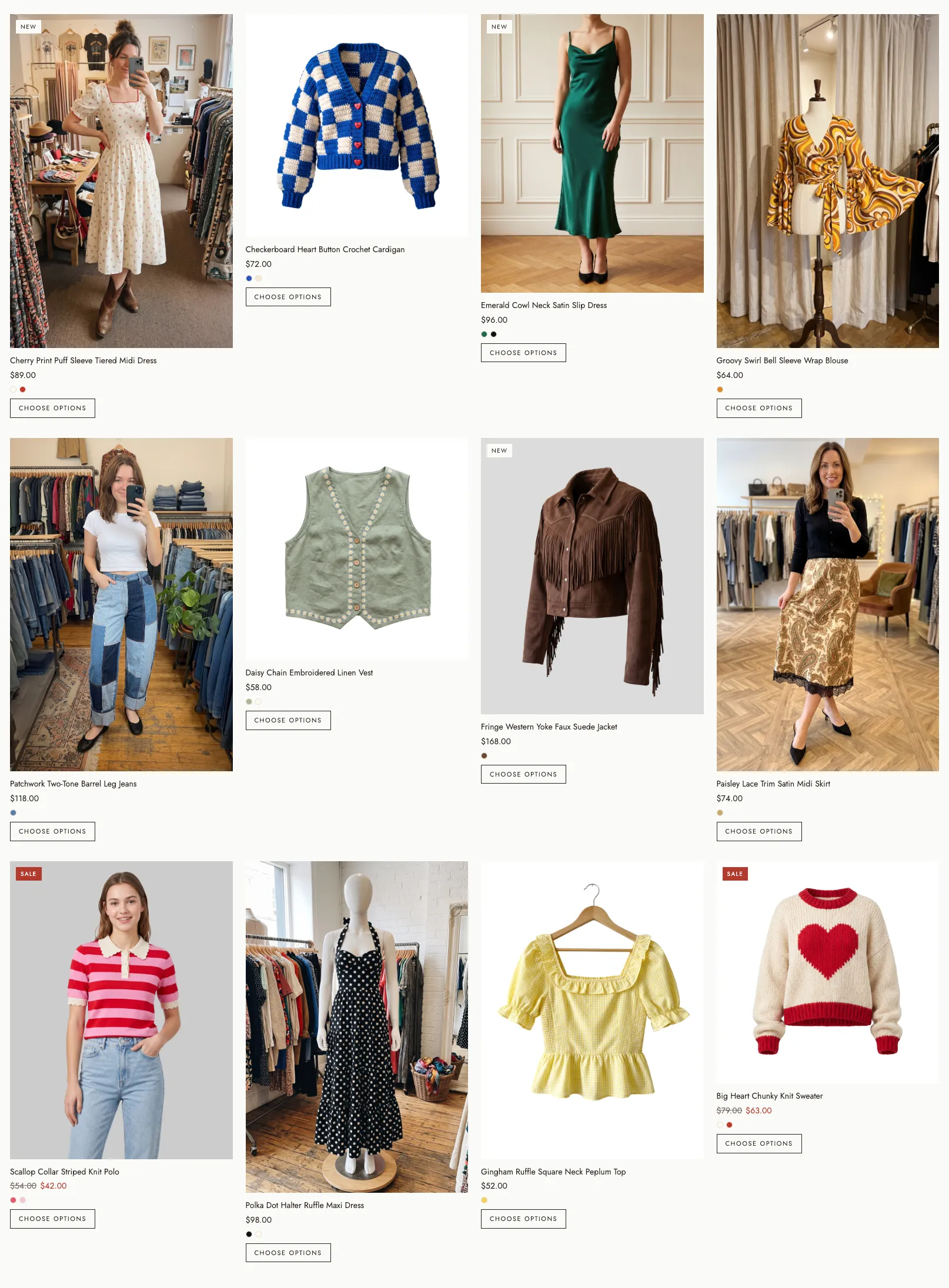
Across a full collection, these small differences add up and make the store look like it was put together in a hurry and can make the shopper second guess if you are legitimate.
The same thing happens outside your store now too. When someone asks ChatGPT or Claude for product recommendations, your product can show up in a row next to your competitors’ products, with your photos right beside theirs. We covered how to check for this in our catalog audit post.
Editing images one at a time doesn’t solve the problem
Most merchants fix their product photos one at a time. You might use an app to remove a background, ask a freelancer to retouch a few hero images, or run a batch through an AI tool.
Each image comes out looking good, but no one has decided what the whole store should look like, so the edited images still don’t match each other.
New products cause the same problem. Every time you add a product, the photo comes from wherever you sourced it, and the store slowly goes back to looking mixed. Fixing 40 images once helps, but without a set of rules to follow, the next 40 won’t match.
What a creative director does for your store and brand
A creative director would typically decide how every product photo in your store should look and then makes sure each new image follows the same rules. Larger brands have someone in this role, which is why you can scroll through a store such as Rhode and every product looks like it belongs to the same brand.
For product photos, the rules usually cover five things:
- Every product sits on the same background color.
- Each product is cropped the same way, with the same amount of space around it.
- Shadows are either on every product or on none of them.
- Products are shown at a size that makes sense next to each other. ie: A small candle, next to a larger one
- Every image is the same ratio and size.
Once the rules are set, they become a repeatable system. Every new product gets edited the same way, so your store stays consistent as your catalog grows.
Most small and mid-sized stores can’t afford to hire a creative director, so we built Store Styling to do this job for you.
Why we created Store Styling
Over the years, thousands of merchants have used our Photo Resize and Background Removal apps to fix their product images. The apps do a good job on each image, but merchants kept asking us how to make their whole store look as consistent as the brands they admire.
Store Styling is our solution to that problem. We take the photos you already have, give direction and set the style for your store, we then edit every image to match, and push the finished images back to your Shopify store. You don’t need a new photo shoot, and you don’t need to download and re-upload anything yourself.
Before and after examples
Here are a few collections we’ve styled, with a note on what we changed in each one to make them look professional and cohesive.
Women’s Fashion
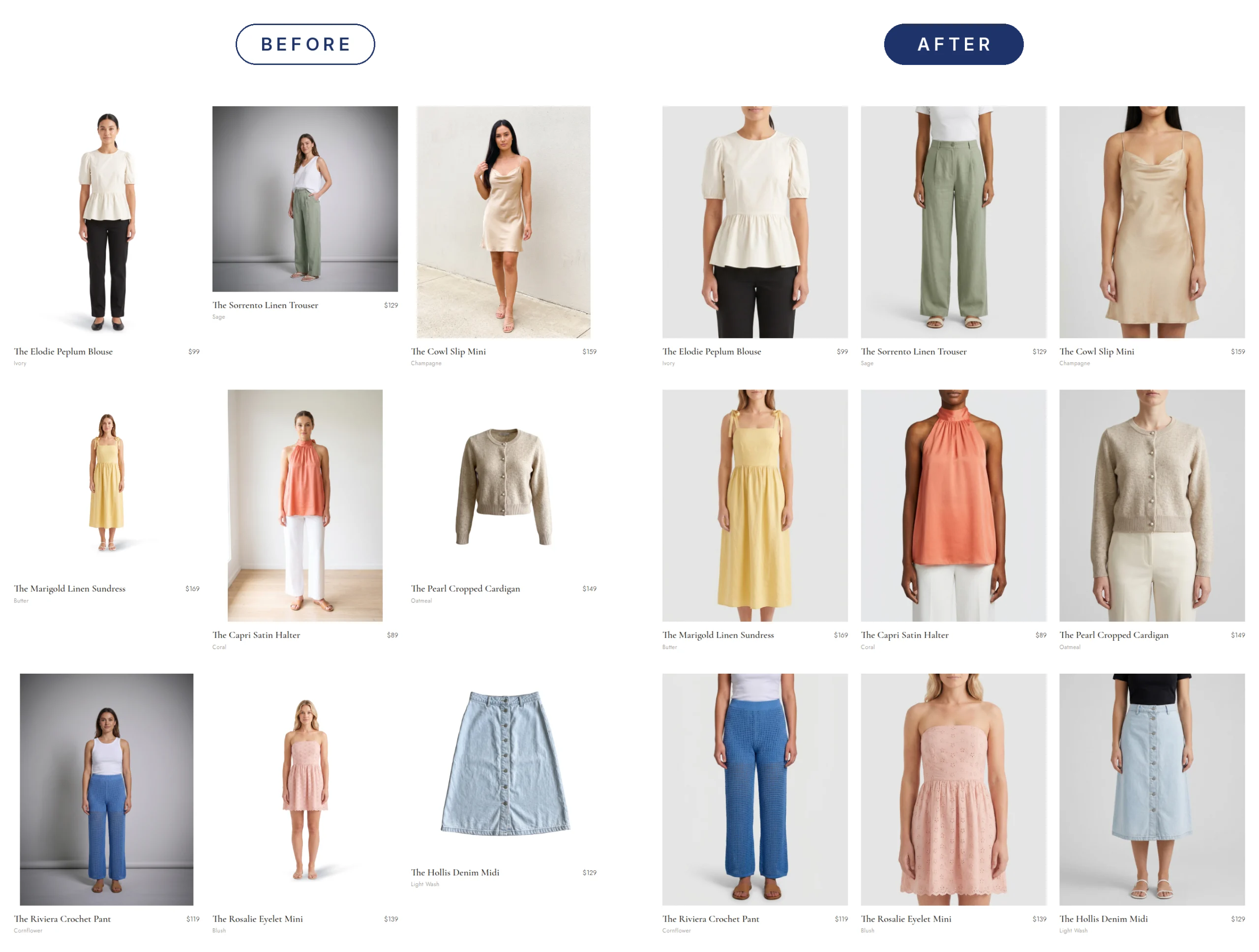
This is an example of a store that has product images from different sources: supplier catalogs, their own DIY model shoots, flat lays, and ghost-mannequin photos. Each product photo looked ok on its own. But once they were placed together, the collection in the grid looked unprofessional.
What we changed:
- Used the same background as if all photos were taken in one photoshoot.
- All products are now worn by a model, framed based on product type so shoppers can easily identify what the products are.
- All images are the same size and take up the same space within the canvas so the grid looks uniform.
- Matched lighting and shadows across the entire collection.
Skincare
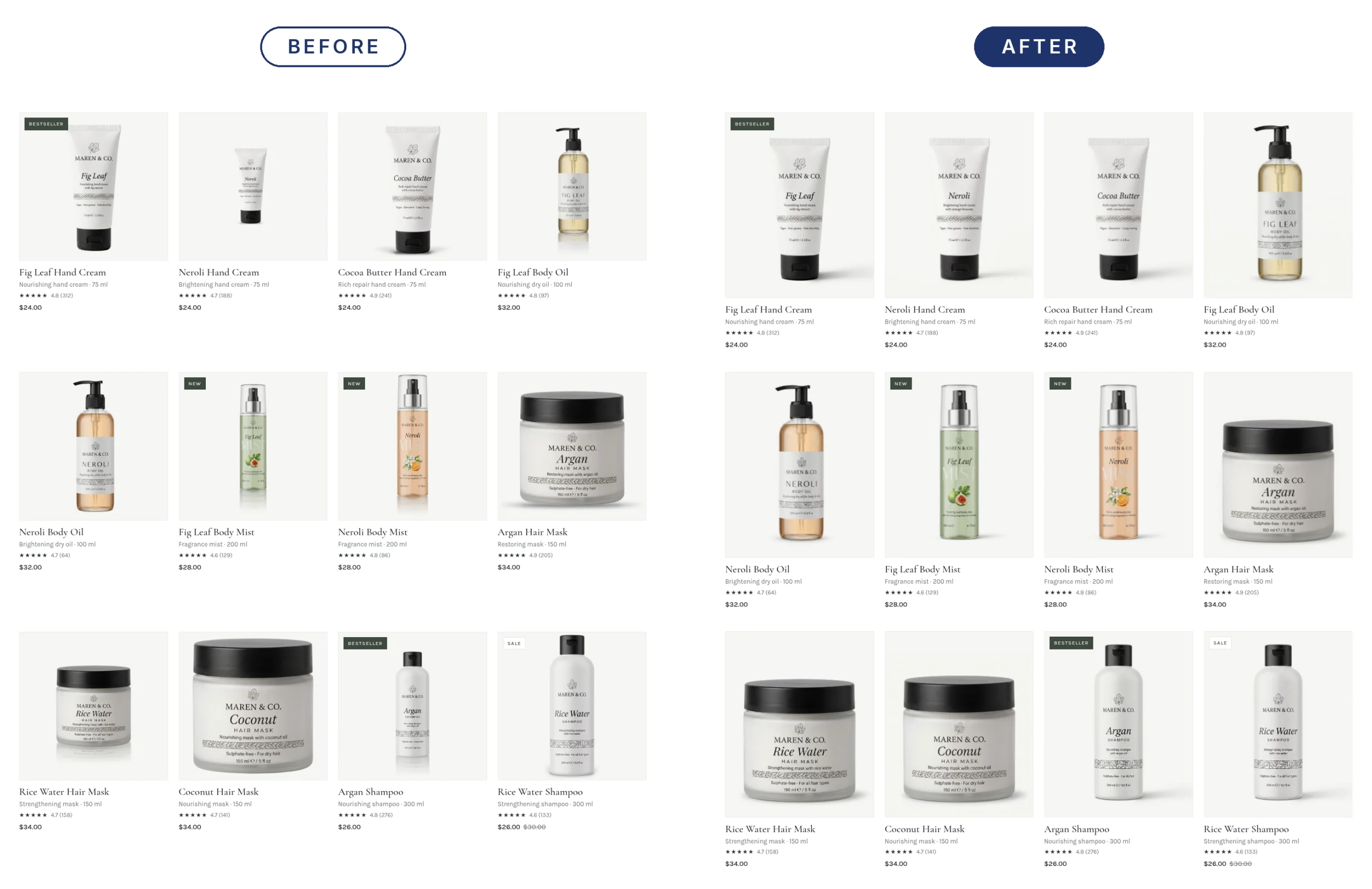
For this skincare store, the product photos were already all the same aspect ratio. Every image is square (1:1). You’d expect a collection grid of same-shaped product photos to look neat, but it doesn’t. Each product photo looked fine on its own, yet side by side the collection looked uneven. The biggest problem here is how much of the image each product takes up. In some photos, the tube almost fills the whole frame. In others, it’s small with a lot of empty space around it, and some tubes sit higher or lower than the rest. On a collection page, it looks as if each product was photographed from a different distance.
So, a 2oz travel jar ends up looking bigger than the full-size 5oz jar next to it. The shadows didn’t match either. Some products had a dark shadow, some had a light one, others had a mirror-like reflection underneath, and one had a shadow off to the side.
What we changed:
- Every product now takes up a consistent amount of space in its frame, so the grid looks even.
- Sizes are true to life: travel sizes look smaller than their full-size versions, so shoppers can tell them apart at a glance.
- All products sit at the same height, as if they were lined up on an imaginary shelf.
- Matched shadows across the entire collection, as if everything was photographed in one shoot.
- Used the same clean white background for every product.
Homewares
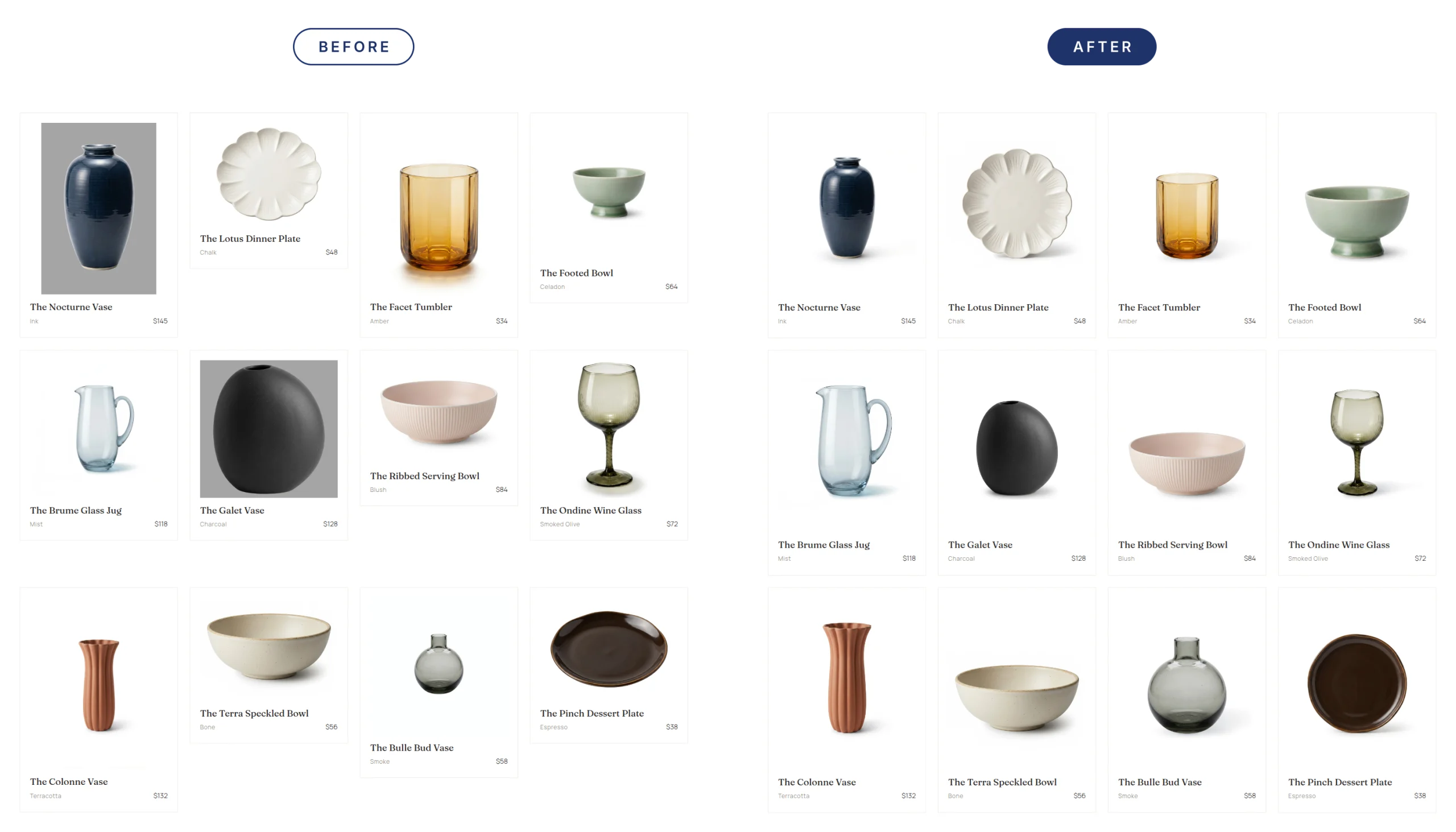
This homewares store example has product photos that came from different sources – supplier images, quick shots on a grey backdrop, and photos cropped to whatever size happened to be on hand.
What we changed:
- Used the same white background, as if all the photos were taken in one photoshoot.
- Made every image the same size and shape, so each product fills the same amount of space in the frame.
- Placed every product on the same surface line, so the vases, bowls, and glassware all sit at the same height across the grid.
- Redo the plates so they look like they’re standing upright instead of from above. This way, they match the angle of the rest of the collection and shoppers can see the full design.
- Matched the lighting and shadows across the whole collection.
Where AI image editing helps and where it doesn’t
With the right creative direction and prompts, AI image editing is very good at creating consistent product photos. It can replace backgrounds, add or remove shadows, even out lighting, fix cropping, correct color so it matches the real product, and clean up dust and small marks on the photo. We use it for all of these in Store Styling.
AI editing goes wrong when it changes the product itself, and second-hand products are the clearest example. If you scroll through Facebook Marketplace, you’ll find listings where AI has been used to smooth out scratches on a table, brighten a faded jacket or make a worn bag look new.
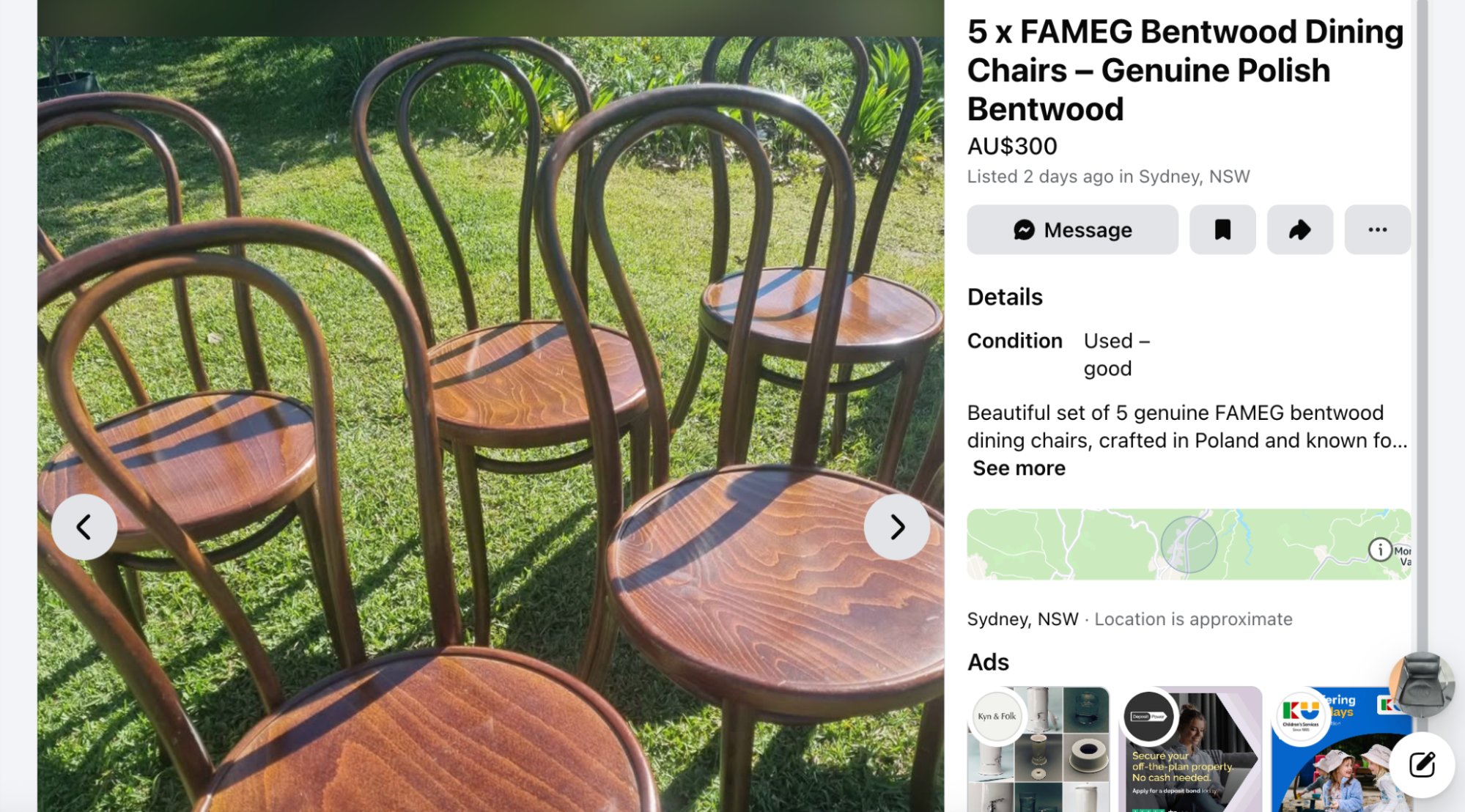
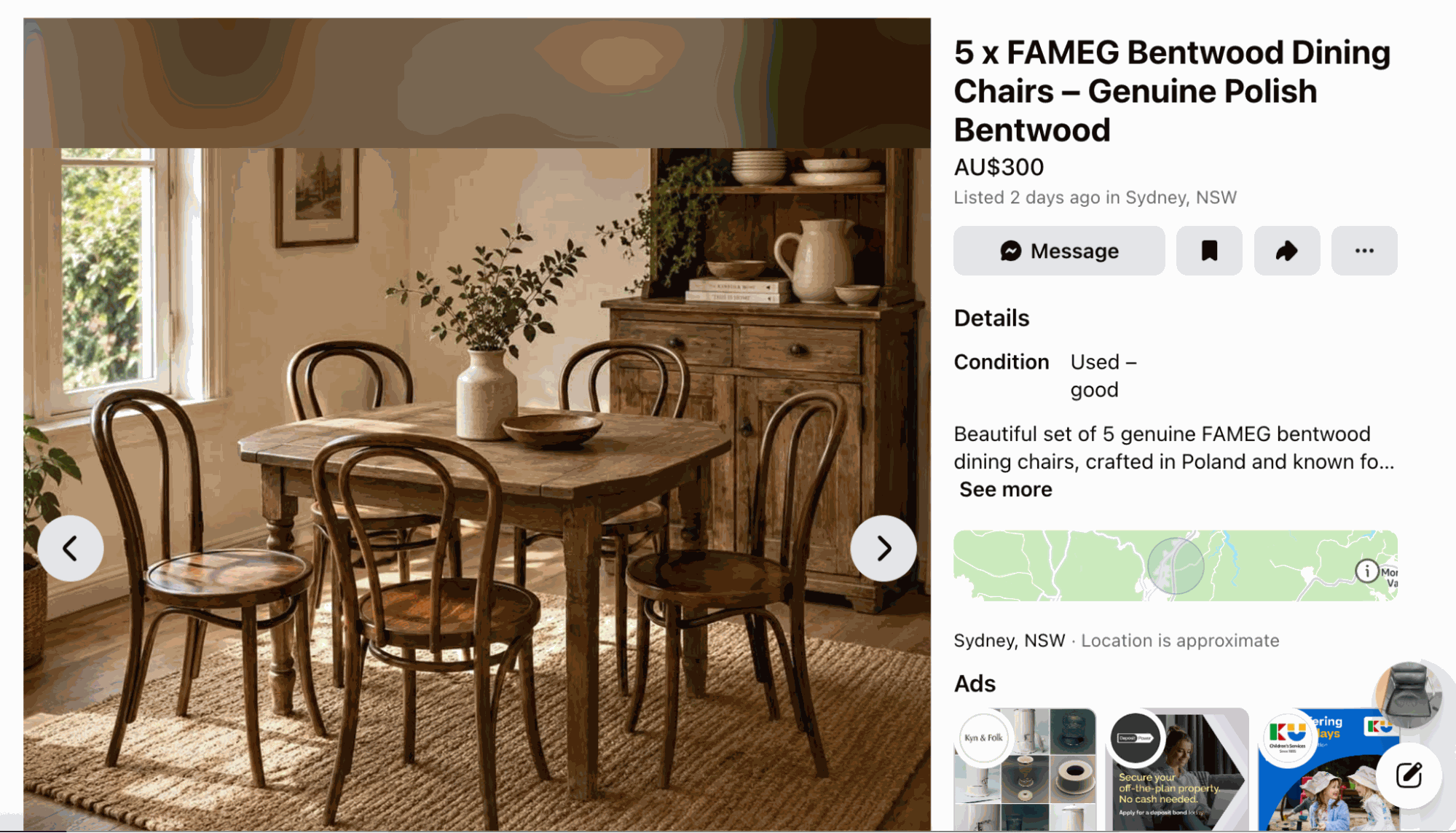
Shoppers find out as soon as the item arrives. You end up with complaints, returns and bad reviews, and the customer is less likely to trust your other listings.
Our rule for Store Styling is simple: we edit the photo and leave the product exactly as it is. If you do sell pre-loved products, we make the photos consistent and clear so shoppers can see the true condition before they buy.
How Store Styling works
Store Styling is a service we provide and we do the work for you.
Here’s how it works:
- Sign up to try Store Styling here
- Choose your first collection.
- We set the style for your store and edit every image to match.
- You review the edited images.
- We push the approved images back to your store.
How to get started with your first collection
Your first collection (up to 40 products) is free. We’d suggest picking the collection that gets the most traffic or the one that looks the most mixed, so you can see the difference on the page that matters most to you.
Once you’re happy with it, we can style the rest of your store using the same rules and keep new products consistent as you add them.
Sign up for your first collection here.
Questions we get about image editing and making a store look more professional
How do I make my Shopify store look more professional?
The quickest way is to make sure your product photos look uniform and consistent – Use the same background (grey, white, light colored), keep a consistent crop, shadow style and image ratio on every product, and start with your collection page that receives the most amount of traffic.
How do I get consistent product photos?
Decide on a set of rules first, then edit every photo to keep it consistent. The rules should cover the background color, how much space sits around each product, whether products have a shadow, and the image ratio. Use the same rules (or prompt) for every new product you add, so your store doesn’t slowly go back to looking like it has a collection of mixed product photos.
What background is best for Shopify product photos?
A plain white or light gray background works for most stores because it keeps the focus on the product and makes a collection page look tidy. Whichever background you choose, use the same one on every product in a collection. The color you select will also depend on the template of your store.
Is it OK to use AI to edit product photos?
Yes, as long as you only use AI to edit the photo and leave the product as it is. Replacing a background, fixing the lighting or adding a shadow is ok too. Removing scratches, changing a color or adding detail that isn’t there misrepresents the product, and will lead to complaints and an increase in order returns.
How long does Store Styling take?
Store Styling is a new service offered by Pixc. We work with you directly to get the results right. We aim to return every collection within two business days.